CRM for Windows & Doors Businesses: How to Manage Leads and Close More Quotes
A spreadsheet isn't a CRM. Your phone's contact list isn't a CRM. A CRM configured for the windows and doors sector increases the quote-to-signature closing rate by 30-45% — here's how it works and how to implement it in your business.
Quick answer
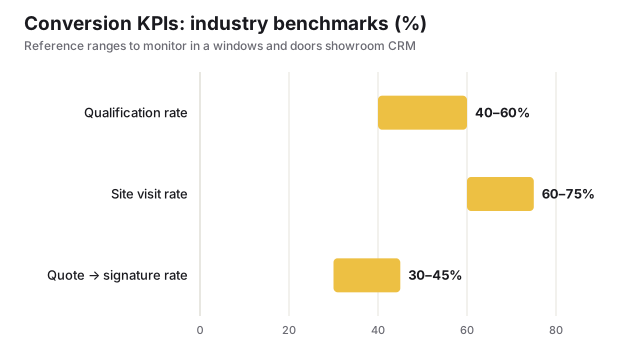
A CRM for windows and doors businesses structures the lead journey into 7 stages — new lead, qualified, visit booked, visit completed, quote sent, negotiating, closed won or lost — and automates the tasks that today depend on memory: a WhatsApp reply within 5 minutes (which secures the site visit 90% of the time), a quote follow-up sequence at 3, 7 and 14 days, a Google review request 30 days after installation and a referral programme invitation at 60 days. The industry benchmarks to monitor are: qualification rate 40-60%, site visits on 60-75% of qualified leads, quote-to-signature conversion 30-45%, average time from lead to signature 15-35 days. Financially, a business with 30 leads a month and an average contract of €7,000 moves from a 25% closing rate (€52,500 in monthly revenue) to 35-38% (€73,500) after 90 days: roughly €21,000 more per month against €200-300 of software cost.
Every month, the owner of a windows and doors showroom handles dozens of contacts: requests from the website, WhatsApp messages, phone calls, emails, referrals from past customers. Without a centralized system, these contacts get scattered across different places — and some of them fall through the cracks without ever reaching a signed quote.
A CRM (Customer Relationship Management) solves this problem. It's not a complicated tool reserved for large companies: it's software that tracks every contact, every quote and every conversation, and automates the repetitive tasks you currently do by hand (or don't do at all).
Why spreadsheets aren't enough
The spreadsheet is the most widely used lead management tool among Italian windows and doors businesses. It works up to a point — but it has four structural limits that get expensive as the business grows.
- 1No visibility into the process: You don't know how many leads have gone more than 7 days without a response, how many quotes were sent without follow-up, or how many site visits never turned into quotes.
- 2No automation: Every action requires manual work. You only do the 3-day follow-up if you remember. Nobody ever sends the post-installation review request.
- 3No integration: Leads from Google Ads land in one place, WhatsApp leads in another, website leads in a third. You copy them into the spreadsheet manually — if you get to it.
- 4No analysis: You can't calculate your real closing rate, the average time from lead to signature, or your highest-ROI channel. You decide by gut feel.
How to structure the CRM pipeline for windows and doors businesses
The pipeline is the heart of the CRM: it represents the journey every lead takes from first contact to signed contract. Structuring it correctly for the windows and doors sector is essential.
The optimal pipeline for a windows and doors showroom has 7 stages:
| Stage | Description | Automatic action |
|---|---|---|
| New Lead | Contact just arrived, not yet qualified | WhatsApp reply within 5 min |
| Qualified | Verified: is the owner, has a budget, has an estimated number of windows | Automatic site visit date proposal |
| Site Visit Booked | Date and time confirmed | Reminder 24h before via SMS/WhatsApp |
| Site Visit Completed | The technician has visited the property | Notification to the quoting team for processing |
| Quote Sent | Document sent to the customer | Start 3/7/14-day follow-up sequence |
| In Negotiation | Customer has shown interest, possible objections in progress | Manual task for salesperson to call |
| Closed Won/Lost | Contract signed or lead lost with reason | If won: post-sale and review sequence |
Every stage needs clear exit criteria. A lead shouldn't move from "New" to "Qualified" until you've verified at least three things: they own the property, they have a compatible rough budget, and the number of windows exceeds a minimum viable threshold (usually 3-4 windows).
Key automations for windows and doors showrooms
1. Automatic response to new leads
As we've seen, whoever responds within 5 minutes has a 90% chance of getting the site visit. No owner can respond to every contact within 5 minutes — but an automatic system can.
The ideal automatic reply message isn't generic. It includes the customer's name (if available), the type of window requested (if collected by the form), and a qualifying question:
"Hi Marco, thanks for reaching out! You wrote to us about replacing your windows — we specialize in high-efficiency windows and can also help you with the eco-bonus paperwork.
To prepare an accurate quote, could you tell me how many windows you want to replace and which municipality the property is in? In the meantime I'll send you our materials catalog. A colleague will get back to you during business hours."
2. Follow-up on unsigned quotes (3/7/14-day sequence)
This is the highest-ROI automation. The moment a quote moves to the "Quote Sent" stage, the CRM automatically starts the sequence:
- 1Day 3WhatsAppHi [name], did the quote arrive? Any questions about materials, installation timelines or eco-bonus paperwork? I'm here to help with anything.
- 2Day 7EmailQuote reminder + attached 2026 eco-bonus guide. Subject: "Your quote + savings guide with the eco-bonus".
- 3Day 14Call/WhatsAppPersonal contact: calendar availability update, possible time-limited offer (e.g. free mosquito net installation by end of month).
3. Post-installation review request
Google reviews are one of the most important factors for converting new leads — but most windows and doors businesses don't request them systematically. With a CRM, the moment a contract moves to "Closed Won" and the installation date is recorded, the system automatically sends:
- Day 3 post-installation: WhatsApp satisfaction check ("Everything good with the new windows?")
- Day 30 post-installation: Google review request with a direct link to the listing
- Day 60 post-installation: invitation to the referral program with an incentive
4. Automatic referral program
An automated referral program turns every satisfied customer into a passive sales agent. The system sends a message 60 days after installation:
With a CRM, this message goes out on its own for every customer whose installation was completed 60 days earlier — no one has to remember it.
Essential integrations for a windows and doors CRM
An isolated CRM loses half its value. The integrations that make the difference for windows and doors businesses are:
WhatsApp Business API
Lets you send WhatsApp messages directly from the CRM, track conversations, and trigger automations based on customer replies. It's different from the regular WhatsApp Business app — it requires a provider like Twilio, 360Dialog or MessageBird (cost: €50-150/month depending on volume).
Google Ads and Meta Ads
Integration with advertising platforms lets you:
- Attribute every lead to the specific campaign that generated it
- Send conversion data (signed quotes) back to Google Ads to optimize campaigns toward leads that actually buy
- Build remarketing audiences based on who reached certain pipeline stages
Email marketing (Mailchimp, Brevo, ActiveCampaign)
For leads who aren't ready to buy yet (they have old windows but haven't decided to act), integration with email marketing lets you add them to automatic nurturing sequences: a monthly newsletter on energy savings, eco-bonuses, new products. When they're ready, they come back to you instead of searching for a competitor.
Google Calendar and booking systems
Integration with Google Calendar lets customers book the site visit themselves via a link (like Calendly) — the CRM records the appointment and sends automatic reminders. It reduces coordination phone calls and missed appointments.
KPIs to monitor in the CRM
The value of a CRM isn't just in the automation — it's in the data. These are the KPIs every windows and doors business should keep in view every week:
| KPI | How it's calculated | Industry benchmark |
|---|---|---|
| Qualification rate | Qualified leads / Total leads | 40-60% |
| Site visit rate | Site visits / Qualified leads | 60-75% |
| Quote → signature rate | Signed contracts / Quotes sent | 30-45% |
| Average lead → signature time | Average days from request to signature | 15-35 days |
| Average contract value | Revenue / Number of contracts | €5,000-12,000 |
| Leads by source | % of leads per channel (Google, Meta, referral...) | Varies by business |
If your quote → signature closing rate is below 25%, the problem isn't marketing — it's the sales process after the quote is sent. If your qualification rate is below 30%, the problem is that you're doing unqualified site visits that cost time without generating revenue.
Comparing the main CRMs for windows and doors businesses
| CRM | Monthly cost | Pros | Cons |
|---|---|---|---|
| Pipedrive | €25-65/user | Intuitive pipeline interface, easy to use, good mobile app | Less powerful automations than competitors, limited reporting on the base plan |
| HubSpot | €0-800+ (limited free plan) | Complete ecosystem (CRM + marketing + service), native integrations | Expensive on advanced tiers, steep learning curve |
| Monday CRM | €35-90/user | Flexible and visual, great for also managing operations | Not built as a pure CRM, requires more initial setup |
| Custom CRM | €150-500/month | Perfectly adapted to your specific process, native WhatsApp integrations | Requires more setup time, dependent on the vendor for changes |
Which one to choose?
For most windows and doors businesses with revenue between €300k and €2M and a sales team of 1-3 people, the recommendation is:
- Low budget (€30-60/month): Pipedrive Essential or Advanced — covers 90% of your needs with the lowest learning curve.
- Medium budget (€100-200/month): HubSpot Starter — adds native marketing automation and better integrations.
- Complex operational needs (you also manage job sites and crews): Monday CRM or a custom solution built specifically for the windows and doors sector.
How to implement the CRM without disrupting operations
The biggest risk when adopting a CRM is the classic "we implement it and then nobody uses it." This happens when the system is too complex, training is insufficient, or there's no one responsible for ensuring it gets used.
These are the steps for an implementation that actually works:
- 1Weeks 1-2: basic setup: Configure the pipeline with the 7 stages, import existing contacts, connect the website form and WhatsApp.
- 2Weeks 3-4: team training: Two 2-hour sessions with whoever will use the CRM daily. Focus only on essential actions: adding leads, moving through the pipeline, logging notes.
- 3Weeks 5-6: automation rollout: One automation at a time, starting with the automatic response to new leads. Test, optimize, then add the next one.
- 4Month 2: KPI review: First data review: qualification rate, closing rate, average lead-to-signature time. Identify bottlenecks and optimize.
The ROI of a CRM for a windows and doors showroom
Let's look at the numbers. A windows and doors business with 30 leads a month, a 25% closing rate and an average contract value of €7,000 generates €52,500 in monthly revenue from leads.
The difference is about €21,000 in additional monthly revenue against €200-300 in software cost. This is why the ROI of a CRM for windows and doors businesses is typically measured in weeks, not months.
Want a CRM configured for your windows and doors showroom?
We set up and manage the CRM for you: pipeline, automations, WhatsApp and Google Ads integrations. First results in 30 days.