WhatsApp Marketing for Windows & Doors Businesses: Automation and Leads in 2026
WhatsApp has a 98% open rate compared to 20% for email. For windows and doors businesses, it's the most effective channel for turning leads into site visits — as long as it's automated correctly.
Quick answer
WhatsApp has a 98% open rate compared with 20% for email, and responding to a lead within 5 minutes gives a 90% chance of getting the site visit, against 36% after an hour and under 10% the next day. For windows and doors businesses the automation rests on five flows: an immediate reply to every new contact, pre-visit qualification (property ownership, budget, timing), appointment confirmation and reminders — which cut no-shows from the typical 30% to 5-8% — quote follow-ups at +3, +7 and +14 days, which lift the closing rate by 15-25%, and a review request 30 days after installation, which brings in 3-5 extra reviews a month on average. Below 20 leads a month, free WhatsApp Business is enough and well-configured auto-replies already cover 70% of the value; above 30 leads you need the API, at €50-150 a month.
The data point that changes everything: whoever responds to a lead within 5 minutes has a 90% chance of getting the site visit. Those who respond after an hour drop to 36%. Those who respond the next day are under 10%. And yet most windows and doors businesses respond within hours, often the next day — if they respond at all.
Automated WhatsApp solves this problem: it responds within seconds, qualifies the lead, books the appointment and then handles the follow-up reminders. All without the owner needing to be glued to the phone.
WhatsApp Business vs. WhatsApp Business API: which one to choose
| Feature | WA Business (free) | WA Business API |
|---|---|---|
| Automatic reply | Yes (basic) | Yes (advanced) |
| Scheduled template messages | No | Yes |
| CRM integration | No | Yes |
| Multi-agent | No | Yes |
| Flow automation | No | Yes |
| Cost | Free | €50–150/month |
| Suited for | < 20 leads/month | > 30 leads/month |
If you're just getting started or have fewer than 20 leads a month, free WhatsApp Business works just fine. With well-configured auto-reply messages you already cover 70% of the value. Above 30 leads a month, the API with a provider like Wati becomes necessary so you don't miss opportunities.
The 5 essential automation flows for windows and doors businesses
Flow 1 — Immediate response to a new lead
Trigger: the lead fills out the form or clicks "Message us on WhatsApp" from the ad.
Example message (within 30 seconds)
"Hi [Name]! 👋 This is [Company Name], I received your request for new windows and doors. To give you an idea of cost and timing right away, could you tell me: how many windows or doors would you like to replace, and in which city is the property? I'll reply within a few minutes. 🏠"
This message has three effects: it demonstrates responsiveness (a decisive factor in choosing a windows and doors company), it gathers qualification information, and it opens the conversation on WhatsApp, where it's easier to talk.
Flow 2 — Pre-site-visit qualification
Trigger: the lead has replied to the first message.
Qualification sequence (automatic)
- Message 2: "Great! Are you the property owner? (required for the 50% eco-bonus)"
- Message 3: "Do you already have an idea of your budget for this project?"
- Message 4: "When would you like to have the work done? That way I can organize the free site visit."
Only leads who respond positively go onto the calendar. The rest go into the nurturing flow.
Flow 3 — Appointment confirmation and reminders
Trigger: site visit scheduled on the calendar.
- -24h: "Hi [Name], just a reminder of tomorrow's site visit at [time] at [address]. Can you confirm? 🏠"
- -2h: "See you soon! For the visit, please bring an ID and, if you have it, the deed or lease agreement."
- Post visit: "Thanks for today! I'll send you the quote within [X days]. Any other questions in the meantime?"
These messages reduce no-shows from the typical 30% down to 5-8%.
Flow 4 — Quote follow-up
Trigger: quote sent (via email or WhatsApp).
- +3 days: "Hi [Name], have you had a chance to read the quote? Any questions, or would you like me to walk through anything?"
- +7 days: "Just a reminder that for work completed by [date] you can still get 50% off through the 2026 eco-bonus — you're still in time. Would you like to move forward?"
- +14 days: "Hi [Name], how are things going? If you're weighing other quotes, I'm happy to jump on a call to clear things up. Sometimes a quick chat is all it takes."
This flow alone increases the closing rate by 15-25% compared to not following up.
Flow 5 — Post-installation review request
Trigger: job completed and final payment received.
Message +30 days after installation
"Hi [Name]! It's been 30 days since your new windows and doors were installed — how are you finding them? Hope everything's great. If you're happy, we'd really appreciate a review on Google: [direct link]. It takes 2 minutes and helps a lot of families find reliable windows and doors businesses. Thank you! 🙏"
Windows and doors businesses that use this flow collect an average of 3-5 more reviews a month, improving their ranking on Google Maps.
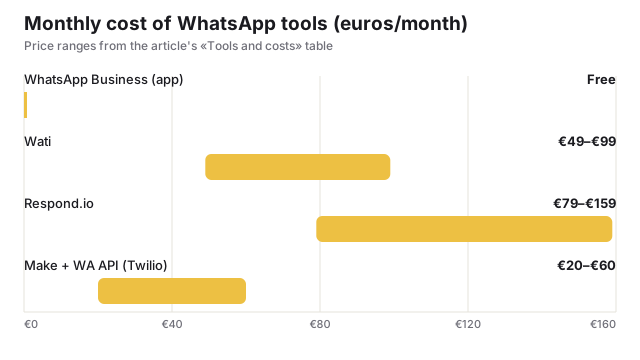
Tools and costs
| Tool | Cost/month | Suited for |
|---|---|---|
| WhatsApp Business (app) | Free | Up to 20 leads/month, manual management |
| Wati | €49–€99 | Advanced automations, multi-agent, basic CRM |
| Respond.io | €79–€159 | Sales team, advanced integrations |
| Make + WA API (Twilio) | €20–€60 | Custom setup, maximum flexibility |
Mistakes to avoid
- ✕Messages that are too formal or too long: on WhatsApp the tone should be conversational. Max 3-4 lines per message.
- ✕Sending unsolicited promotions: sending offers to contacts who haven't explicitly shown interest is spam and can get your account banned.
- ✕Not personalizing the name: even an automation needs to feel human. Always use the lead's name.
- ✕Too many messages too close together: respect the pacing. One message a day is the maximum tolerated without seeming pushy.
- ✕Not monitoring response rates: if fewer than 40% of leads respond to the first message, the copy needs to be rewritten.
Want us to set up WhatsApp automation for your business?
In 2 weeks we activate the complete system: immediate response, qualification, quote follow-up and review collection. All automatic.